5 Tips for Effective Communication
🛑 Don’ts & ✅ Do’s for Effective Remote Communication
Daily written communication is as essential as the code produced.
The clarity of written messages can significantly influence efficiency: a colleague might take either 1 minute or 10 minutes to interpret a message. If this occurs multiple times each day, clearer writing could save the company considerable time.
Use Shorter Sentences for More Effective Communication
Short sentences convey information more powerfully and are easier to comprehend than longer ones.
🛑 Don’t: The API, which was developed using Python and includes multiple validation layers and error-checking mechanisms, processes the user input after ensuring all required fields are present and correctly formatted according to the specification.
✅ Do: The API validates user input before processing the request.
Tip 1: Focus Each Sentence on a Single Idea
Just as a single line of code executes a specific task, each sentence should express one idea.
🛑 Don’t: The authentication system handles user login requests by first validating the provided credentials against the database, then generating a secure JWT token if validation succeeds, and finally returning the token to the client which can be used for subsequent API calls until it expires after 24 hours.
✅ Do: The authentication system manages user login requests. First, it validates the provided credentials against the database. If validation is successful, the system generates a secure JWT token. The token is then returned to the client and can be used for subsequent API calls, expiring after 24 hours.
Tip 2: Eliminate Filler Words for More Direct and Effective Writing
Many sentences include filler words that add little value. Removing these words enhances clarity and impact.
🛑 Don’t: It should be noted that in order to properly save any changes that have been made, it is necessary for the user to proceed to click on the submit button.
✅ Do: Click the submit button to save changes.
With practice, recognizing filler words becomes easier. Here’s another example:
🛑 Don’t: The logging system performs the monitoring of application errors.
✅ Do: The logging system monitors application errors.
The table below provides concise alternatives to common filler words.
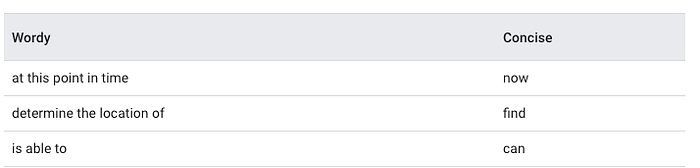
Tip 3: Subordinate Clauses Should Support, Not Distract from, the Main Sentence Idea
Every sentence consists of:
- A main clause
- Zero or more subordinate clauses
Subordinate clauses should enhance the main clause’s idea rather than introduce unrelated information. Common words that introduce subordinate clauses include which, that, because, whose, until, unless, and since.
The goal is to use subordinate clauses that support the main idea without diverting into a separate concept.
Consider these examples where subordinate clauses distract from the main idea, along with improved versions:
🛑 Don’t: Docker containers provide application isolation, which was first released as an open-source project in 2013 and has revolutionized deployment practices.
✅ Revised: Docker containers provide application isolation. They were first released as an open-source project in 2013 and have revolutionized deployment practices.
🛑 Don’t: Git helps track code changes effectively, which requires developers to learn specific commands that can be complex for beginners who are transitioning from other version control systems.
✅ Revised: Git effectively tracks code changes. It requires developers to learn specific commands that can be complex for beginners transitioning from other version control systems.
In the following examples, the subordinate clauses support the main idea, so they can remain:
✅ Do: Developers should use environment variables that contain sensitive configuration data.
✅ Do: She didn’t attend the meeting because she had a prior commitment.
Now, analyze another example and identify the subordinate clauses to determine if they should be removed:
❓Example: The project deadline has been extended, which will allow more time for testing, because some team members were out sick.
Technical Folks Love Lists: Use Them Correctly!
There are three main types of lists:
- Numbered lists: Use these when items are ordered, and rearranging them would change the meaning.
- Bulleted lists: Use these when items are not ordered, so rearranging them won’t alter the meaning.
- Embedded lists: Avoid these in technical information, as they contain items within a sentence and can be difficult to read.
Tip 4: Convert Long Sentences into Lists
Often, lengthy technical sentences can be transformed into lists for improved readability.
🛑 Don’t: To log in, users must enter their username and password, followed by a two-factor authentication code that will be sent to their registered device, which they must then input within 60 seconds.
✅ Do: The login process requires:
- Username
- Password
- Two-factor authentication code
When encountering an “or” conjunction in a long sentence, break it down into a list.
🛑 Don’t: To secure your AWS account, you can enable multi-factor authentication, implement IP-based restrictions, rotate access keys regularly, or set up CloudWatch alerts for suspicious activities.
✅ Do: To secure your AWS account, you can:
- Enable multi-factor authentication
- Implement IP-based restrictions
- Rotate access keys regularly
- Set up CloudWatch alerts for suspicious activities
Tip 5: Keep Lists Parallel
Effective lists are parallel; non-parallel lists tend to feel disjointed. In a parallel list, all items should match along these parameters:
- Grammar
- Logical category
- Capitalization
- Punctuation
Here’s an example of a non-parallel list where the second item uses a full sentence, while the others are short phrases:
🛑 Don’t:
- Lightweight design
- The device can last up to 12 hours on a single charge
- Comes in multiple colors
In contrast, the following list is parallel:
✅ Do:
- Lightweight design
- Long-lasting battery
- Multiple color options
The following list is non-parallel because the second item is in passive voice:
🛑 Don’t:
- Label all drawers.
- Supplies should be sorted by type.
- Place bins in accessible locations.
✅ Do:
- Label all drawers.
- Sort supplies by type.
- Place bins in accessible locations.
The next list is non-parallel because the second item doesn’t start with an imperative verb:
🛑 Don’t:
- Exercise daily.
- A balanced diet.
- Get enough sleep.
✅ Do:
- Exercise daily.
- Eat a balanced diet.
- Get enough sleep.